Understanding History through Primary Documents: Hurricanes
Objectives:
- Students view and compare primary source documents about hurricane experiences.
- Students gain knowledge about hurricanes and weather safety.
- Students discuss the importance of weather forecasting.
- Students complete an informational writing task.
Hurricanes: past and present
Picture 1
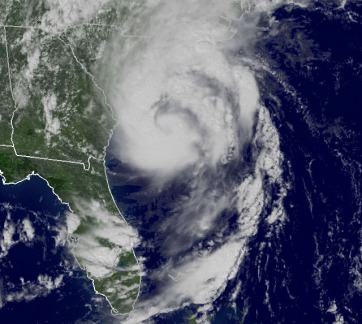
Students view a satellite image of Hurricane Ernesto that happened in 2006. Do not tell the children what the picture represents. Possible questions for you to ask the students:
image from http://www.wunderground.com/hurricane/history/Ernesto.jpg
Hurricane Ernesto 2006
- What is this picture?
- What does this picture tell us?
- How was this picture taken?
- What is the white in the picture?
- What part of the world is shown?
image from http://www.wunderground.com/hurricane/history/Ernesto.jpg

Hurricane Ernesto 2006
Picture 2
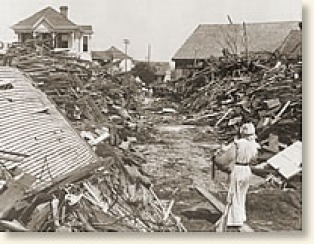
Show the students this picture. Question prompts include:
image from http://www.eyewitnesstohistory.com/images/galveston1.jpg
The Galveston Hurricane of 1900
- What do you see in this photograph?
- What do you think happened?
- Why did this happen?
- Why do you think there is no color in the photo?
- When do you think this took place?
image from http://www.eyewitnesstohistory.com/images/galveston1.jpg
The Galveston Hurricane of 1900
Explain what both photographs represent to the children. Discuss what a hurricane is and how the weathermen and meteorologists keep us informed of potential storms and danger. Make a group list of ways we stay safe during thunderstorms and hurricanes. Ask the children how we know when a severe storm is approaching.
Tell the children they will be listening to two people's personal stories about a hurricane experience. One story is from over 100 years ago and the other story is from just a few years back.
Read the document The Galveston Hurricane of 1900 to the children while it is displayed on a smart board. You may wish to leave out some of the details that may scare kindergarten students.
Read the document Hurricane Katrina.
Activity 1: Part 2
Make a compare and contrast graphic organizer about the two storm accounts. Talk about how these documents are true stories from a person who experienced these storms. Discuss the importance of the National Weather Service and Weather News Reports. Brainstorm how today’s technology helps keep us safe during severe storms.
Have your students write a News Report in order to create their own primary source document. Their report should consist of a personal experience during a thunderstorm and what actions they took to stay safe. Complete Be a News Reporter. Adult assistance may be needed. When all students' work is complete, create a digital book of their work or print each child’s page to make a book for the classroom library.
Tell the children they will be listening to two people's personal stories about a hurricane experience. One story is from over 100 years ago and the other story is from just a few years back.
Read the document The Galveston Hurricane of 1900 to the children while it is displayed on a smart board. You may wish to leave out some of the details that may scare kindergarten students.
Read the document Hurricane Katrina.
Activity 1: Part 2
Make a compare and contrast graphic organizer about the two storm accounts. Talk about how these documents are true stories from a person who experienced these storms. Discuss the importance of the National Weather Service and Weather News Reports. Brainstorm how today’s technology helps keep us safe during severe storms.
Have your students write a News Report in order to create their own primary source document. Their report should consist of a personal experience during a thunderstorm and what actions they took to stay safe. Complete Be a News Reporter. Adult assistance may be needed. When all students' work is complete, create a digital book of their work or print each child’s page to make a book for the classroom library.
Activity 2
Map Reading Lesson:
Objectives:
- Students learn cardinal directions.
- Students understand a map grid.
- Students use map skills to find places in a town.
- Students use technology to see weather conditions throughout the globe.
- Students locate places on google earth.
- Students use computer skills to drive a vehicle on a 3D map.